
Discover 15 top-rated docking stations for ultimate productivity
In today's fast-paced digital landscape, having the right connectivity options can transform your laptop experience from basic to extraordinary. Laptop docking stations are essential tools for professionals seeking to expand their device capabilities. They provide additional ports, enabling seamless connections with monitors, keyboards, and other peripherals. As remote work continues to thrive, the demand for versatile, high-performance docking solutions grows. This category not only affects productivity but can also significantly enhance your workspace efficiency. Imagine being able to connect multiple devices with just one cable. This article will explore the latest innovations in docking stations, helping you choose the right one to elevate your connectivity game in 2025.
Through detailed analysis of Amazon's offerings, I've curated this collection of top-performing products.




The LIONWEI 13 in 1 USB C Docking Station is designed for users seeking extensive connectivity. Featuring two HDMI ports, a DisplayPort, and eight USB ports (including USB-C), it offers ample options for connecting various devices. The dock supports fast data transfers of up to 10Gbps and provides 100W power delivery, ensuring your laptop remains charged during use. Additionally, the Gigabit Ethernet port enhances internet connectivity, making it suitable for gaming and streaming.
Users consistently report satisfaction with the LIONWEI dock's plug-and-play functionality. The ability to connect multiple displays and peripherals without hassle is highly valued. However, some users have encountered limitations with macOS, where only one 4K monitor can be extended. The device's build quality is solid, and the 18-month warranty adds peace of mind for potential buyers.
Anker's 8-in-1 Docking Station is packed with features that cater to demanding users. It includes two HDMI ports for connecting external displays, a Gigabit Ethernet port for fast internet, and multiple USB ports for data transfer and device charging. The dock supports pass-through charging up to 85W, ensuring that your laptop remains powered while using the dock's various functions.
Customer feedback highlights the dock's ability to handle multiple displays and devices efficiently. The dual HDMI outputs allow for versatile configurations, though macOS users should be aware that they will experience mirrored displays rather than extended ones. Overall, the dock is praised for its reliability and performance, particularly in professional environments.
The Selore 14 in 1 Docking Station is designed for users who require a comprehensive solution for their connectivity needs. Featuring a combination of HDMI, VGA, USB-C, and USB-A ports, it supports a wide range of devices and allows for connections to three monitors simultaneously. The dock also supports 100W power delivery, which is essential for maintaining laptop battery levels.
Feedback from users highlights the dock's efficiency in handling multiple connections, making it ideal for professionals who work with several applications at once. However, some users have noted that the dock is quite bulky, which could pose a challenge for those looking to travel frequently with it. The overall performance remains strong, making it a viable choice for stationary setups.
UGREEN's 14 in 1 Docking Station is engineered for professionals who demand top-tier performance. It features dual HDMI and a DisplayPort, allowing for high-resolution connections across three monitors. With 100W power delivery and multiple USB ports, it caters to a wide array of devices and peripherals.
Users rave about the dock's ability to seamlessly integrate into their workspaces, providing a stable connection for multiple displays. The fast data transfer speeds of up to 10Gbps are particularly appreciated in media-heavy environments. However, some users feel that the price point is on the higher side, which might deter some potential buyers.
Dell's WD19 130W Docking Station is a versatile solution that supports a variety of connections. With USB-C, HDMI, and dual DisplayPort options, it is engineered for productivity. The docking station delivers up to 90W power to connected laptops, ensuring they remain charged during use.
Feedback indicates that users find the dock to be reliable and efficient, particularly when used with compatible Dell devices. The design allows for easy cable management, helping to maintain a clean workspace. However, users of non-Dell laptops may encounter limitations in functionality.
Designed for professionals, the TobenONE USB-C Docking Station supports multiple monitors and provides a wide range of connectivity options. With capabilities for both 4K and 8K displays, it is ideal for those in creative fields. The docking station also includes USB-C and USB-A ports for data transfer and charging.
Users frequently commend the dock for its performance in demanding environments, enabling smooth multitasking and high-resolution displays. However, the pricing is considered high for some, particularly in comparison to similar products in the market.
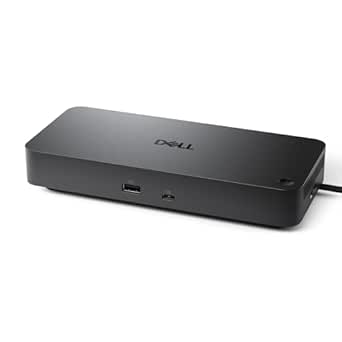
The Dell Universal Dock UD22 is designed to enhance coworking spaces with its extensive port options. Supporting multiple connections, it allows for efficient multitasking and seamless integration with various devices. The dock is engineered to deliver reliable performance and power.
Users report satisfaction with the dock's ability to connect different systems without issues. The modern design and multiple ports enable a clutter-free workspace. However, some users feel that the pricing is steep for the features offered.
Anker's Prime Docking Station is designed for users needing a comprehensive connection solution. It features 14 ports, including USB-A, USB-C, and HDMI, making it suitable for a variety of devices. The dock also provides fast charging options, supporting multiple devices simultaneously.
Feedback highlights the dock's reliability and efficiency, particularly in professional settings. The ability to connect dual displays is a major plus for multitaskers. However, the price may deter budget-conscious users.
Anker's Prime TB5 Docking Station is a powerful docking solution that supports Thunderbolt 5, allowing for lightning-fast data transfer and multiple display outputs. The dock is equipped with a variety of ports, catering to diverse connectivity needs.
Users appreciate the dock's performance, especially in high-demand environments such as gaming and content creation. The ability to connect multiple 8K displays is a significant advantage. Nonetheless, the premium price may be a barrier for some potential buyers.
The Dell Pro Dock WD25 is designed for users seeking a reliable docking solution. With USB-C, HDMI, and multiple DisplayPort connections, it supports a range of devices and displays. The dock offers up to 100W power delivery, ensuring laptops stay charged during use.
Users report high satisfaction with the dock's performance and compatibility with various systems. The build quality is robust, and the design allows for effective cable management. However, some users find the price to be on the higher side.
Acer's Premium 13-in-1 Docking Station is built for users needing a versatile connection hub. With support for dual 4K displays and various ports, it caters to demanding workflows. The dock also provides a robust power delivery of 110W.
Users frequently commend the dock for its ease of use and extensive features. The ability to connect multiple monitors is a significant advantage for professionals. However, some users feel the price is higher than expected for a dock that is not brand-specific.
Anker's Prime Docking Station DL7400 is designed for users needing advanced connectivity solutions. With 14 ports and support for triple displays, it is suitable for multitasking and professional use. The dock also features a built-in cooling system for optimal performance.
Feedback indicates that users appreciate the dock's versatility and ability to connect multiple devices. The cooling system is a notable feature, ensuring that performance remains steady under load. However, the price may deter potential buyers looking for budget-friendly options.
The WWLSV 12-in-1 USB C Hub is tailored for users seeking a budget-friendly docking solution with essential features. It supports dual monitors with HDMI and VGA outputs, along with various USB ports for data transfer and power delivery.
Users find the hub to be a great value for the price, providing multiple options for connectivity. The ability to support dual monitors is particularly beneficial for productivity. However, some users have noted concerns about the overall build quality.
The UGREEN 7 in 1 Docking Station is designed for users needing a compact and efficient docking solution. With dual HDMI outputs and several USB ports, it provides essential connectivity for various devices.
Feedback from users highlights the dock's ease of use and reliable performance. The dual 4K display support is particularly valued by professionals. However, some users feel that additional ports would enhance its functionality.
Anker's 13-in-1 Laptop Docking Station is designed for users who need a robust connectivity solution. It features multiple display outputs and a variety of ports for USB-A and USB-C connections, making it compatible with a range of devices.
Users find the dock to be highly functional, especially for multitasking across multiple displays. The build quality is praised, but the pricing may be considered high compared to other similar products.
In conclusion, selecting the right laptop docking station can significantly impact your productivity and workflow. Consider factors such as the number of ports, compatibility with your devices, and any specific features that cater to your work style. Remember to assess the price range of available options, as investing in a reliable docking station can save you time and frustration in the long run. Whether you're setting up a home office or enhancing your work desk, the right docking station is an invaluable asset. Don't wait-boost your connectivity today!
Explore your options now!